

Please note this website is intended for Italy. In order to ensure compliance with local legal requirements we need to redirect you to the country you are located in.
CONTINUE

Easily diagnose and resolve device issues in minutes. Start troubleshooting right away: we'll guide you to immediate, accessible solutions—no waiting or queuing. If eligible, you can request a replacement device yourself.
Go to the solver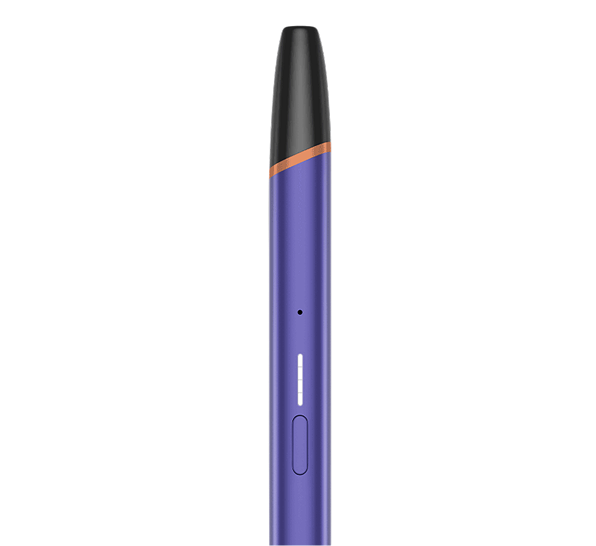
Blinking white lights
Bottom light blinking
How to reset
Red flashing light
Pod liquid leak
Blinking white lights indicate that your device might be exposed to outside of its operating temperature range and you may need to give your device a few minutes to get back to the correct operating temperature between 0°C and 40°C.

Your device needs to be charged. For optimal charging performance, only use a manufacturer-approved Charging Cable supplied in the box and a certified AC Power Adaptor.

When there are no lights on button press, your VEEV ONE might be discharged or you might need to reset it. To perform a reset, press and hold down the ON/OFF button for 10 seconds until status lights fade out. Reset will be confirmed when status lights fade in again and status lights blink white twice.

This indicates that your pod might not be correctly inserted. Please, re-insert correctly your pod or try using a new one. If the lights are still blinking, perform a reset.

Droplets of liquid that are visible on the mouthpiece of the device may occur during normal use. These droplets must be wiped off with a clean dry cloth before you use the device. Do not use this product if the device appears damaged, tampered with, broken, or leaking. In case of contact with leaking e-liquid from VEEV ONE, wash the affected area immediately with soap and water, in case of contact with the skin, or to wash the affected area accurately with water for few minutes, in case of contact with the eyes.


If you are on vacation or traveling for work in a country where VEEV is available and your device is damaged, let us know and we will send you a free replacement device.
There are several ways you can reach us.

Your question might have already been asked before. Browse our FAQs to see if there’s an answer waiting for you.


Chat to our experts in real time. They're available every day from 9AM to 8PM. Just give them a message and they'll say hello within seconds.

To talk with a VEEV Expert.

Find the nearest VEEV store to you.